
The 760-series replaced the 755-series and introduced much larger, higher resolution displays, Lithium batteries and a raise-and-tilt keyboard - probably is it's most unique feature amongst other Thinkpads. There were many versions which are divided into three completely unique chassis:
- The slim 760C & L which can only host a floppy drive and not an optical drive.
- The 'fat' 760CD, LD, E, ED, EL, ELD, XL & XD which can contain a floppy or optical drive.
- The much larger 765D & L which has a large chassis and screen to all the other 760s.
Most of these machines only offered TFT displays, but there was a brief period where IBM offered the optional downgrade of a DSTN panel - so beware!
If I was to name the stand-out models, they'd be
- 760C is a slimline 760 - a neat, small portable machine.
- 760ED - the much-upgraded iteration, mid life-cycle with MPEG decoder.
- 760XD - The final 'Space Station' edition with the highest spec.
- 765D/L - The next-gen 'stopgap' before the 770. Just because it's a bit weird.
Ones which are a bit 'meh'....
- I wouldn't bother with the L because it's just a cut-down C without a soundcard.
- I wouldn't bother with the CD because it's just a C with a bigger chassis to accomodate a CD-ROM drive.
- I wouldn't bother with the LD as it's just a cut-down CD.
- I wouldn't bother with the E because the ED is an enhanced version of the E with MPEG hardware.
- I wouldn't bother with the EL or ELD because it's a similar, but lower spec ED!
- I wouldn't bother with the XL because it's just a lower spec XD!
Owner's Notes
This series has got to be one of the biggest minefields when it comes to model-naming and slight variations in build and specification making it quite difficult to nagivate through a repair or refurb. Having stripped a bunch down to make them good again, I made a huge list of things I'd learned.
A list of the first things I'm aware of:
- The complete memory configuration changed many times:
- 760C, 760CD, 760L, 760LD = 88pin EDO - hard to find.
- 760E, 760ED, 760EL, 760ELD, 760XD, 760XL = 144pin EDO - common.
- If you put the memory daughterboard from a 144pin machine in a 88pin machine you just get a white screen when powering up.
- L models did not have Mwave audio, using the cheaper ESS 1688 Audiodrive instead"
- Hot take - L models were 'consumer' end models of this business-end laptop.
- CD models have nothing to do with having a CD-ROM drive, altbough D mostly means the case is built to accomodate one (apart from the EL, ELD and XL which also have the case to accomodate a CD-ROM drive!)
- All models have a timebomb hibernation battery built into the palmrest, which must be snipped out ASAP.
- If you attempt to remove the hibernation battery, the PCB it's connected to contains 4 connectors - 2 to stereo speakers, 1 for CMOS and 1 for hibernation. These connectors are exremely brittle and I've found it very risky to do anything other than snip off the hibernation battery wires because trying to move the board often creates more problems.
- Many keyboard have a '08611' trackpoint error, which I have not found a fix for, despite not using the 'timebomb' pencil-erasor style trackpoint nub. Someone has told me that deep cleaning the trackpoint mechanism with contact cleaner may resolve this, but I've yet to try it out.
- There was no CDV model despite some erroneous IBM press-releases, which look like cut-paste jobs from the 755 range, which accidentally left in references to a CV model.
- All keyboards are interchangable (with exception of 765 which has a wider palmrest)
- DSTN screens were available but rare - be careful if buying an EL model as these had the DSTN option.
- There were at least 3 types of TFT in 10.4", 12.1" and 13.3" variations, with later 12.1" and 13.3" displays offering XGA. 13.3" screen will only fit inside the larger 765 chassis, so all 760 model machines have a maximum size of 12.1"
- Floppy drives are very similar to 355/360/370/755 floppy drives but have a weird plastic slider down the right side - seems like a 'spacer'.
- I think the 760C and L hard drives are interchangable with 355/360/370/755 however, all the later, fatter 760 machines are not compatible.
- Simlar to the 770, I've found the TFT screens can succum to a degradation around the edges - a flourescent cloud that shows up on black screens.
- Whilst the 765 is considered part of the 760 family and whilst shares a similar design, it's chassis is completely different to the 760-series and therefore the screen and internal layout is bigger and not interchangable.
- On the back-left-side of the m-wave equipped models Mwave equipped model (760CD, 760ED, 760XD, there is an empty slot which can hold an expansion connector/port for the MWave-based audio and modem card - The external DAA Telephony Kit connector. DAA = Data Access Arrangement. This was an option sold in a country for which the standard internal telephone jack connector was not approved, hence it was supplied with a blanking plate rather than modem socket. The DAA box arrangement sidestepped some country certification problems that would not /could not approve the internal phone jack arrangement more commonly seen. If you look on the label on the bottom of an Mwave-equipped 760, it should show a number of telephony certifications along with all the other FCC, CE, etc. regulatory certifications.

12.1" TFT Gotchas
One aspect that can catch you out when restoring a bunch of these and shifting interchangable parts from good to bad machines is that there are two types of 12.1" TFT lids which support the two very similar but different SVGA and XGA LCDs. SVGA was the new standard at the time which displayed 800 x 600 pixels on screen, whereas XGA was a new high-end proposition which displayed 1024 x 768 pixels on screen.
1) SVGA Lid/LCD:
- It's thicker but will fit all 760 models.
- SVGA LCD has a different mainboard connector to XGA
- Has a longer LED panel which slots into the back of the keyboard
2) XGA Lid/LCD:
- Thinner than the SVGA lid but will fit all 760 models
- XGA LCD has a different mainboard connector to SVGA
- Has a shorter LED panel which slots into the back of the keyboard
Each variant's connectors are keyed differently and will not fit to the opposing connector:
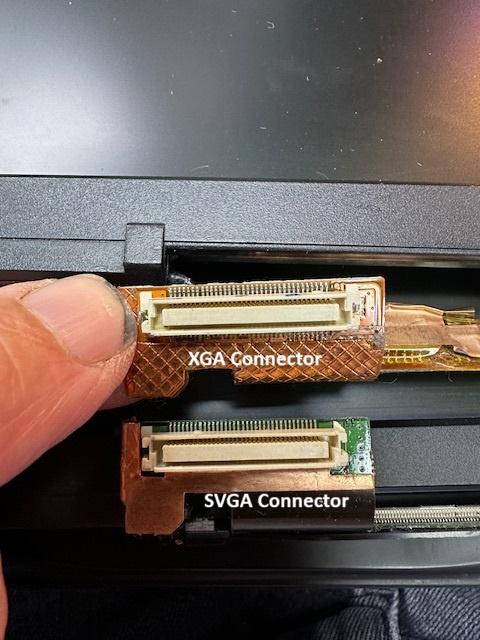
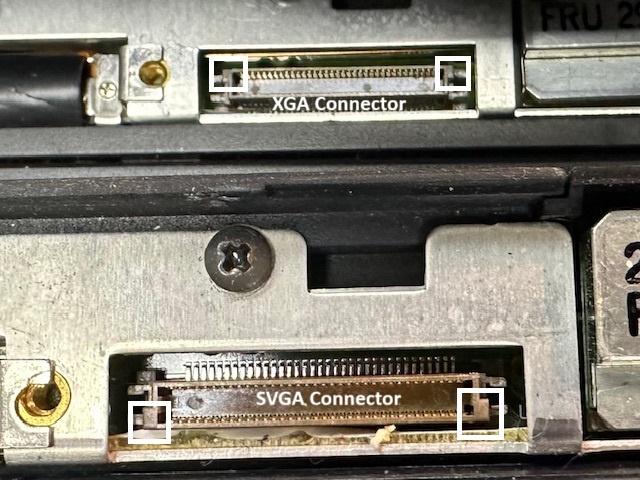
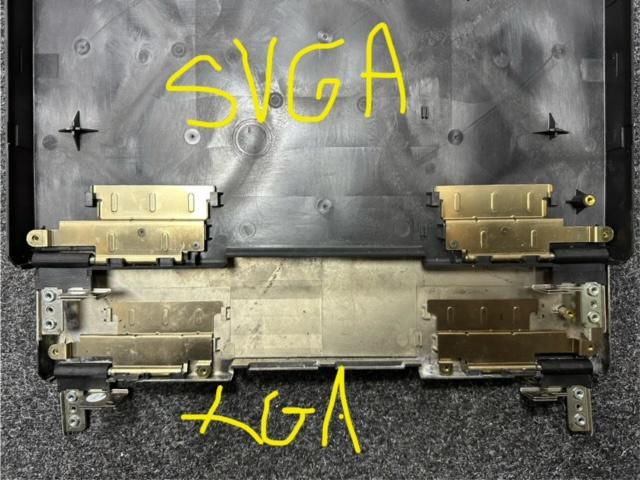
Also the hinges are different and are not interchangable. I disassembled have two types of hinge, using a slightly different but very similar design. They're bolted down slightly differently and not interchangable:
Finally, whilst all the screw standoffs are in the same place, meaning you can physically swap different TFTs between different lids and bezels, the standoffs are different depths, and the LCD bezel itself is different (one has to be shallower). So basically don't bother trying to swap SVGA and XGA panels between lids.
I also discovered 3 different lid design for the 2 types of TFT panel - one has 6 screws at the base underneath two strips of black plastic stuck down over the top.
SVP and BIOS Passwords
In my experience, the 760 has a confusing set of 'built in' passwords. Generally these are known as 'power on' - which is often said to be erased by disconnection power, main and CMOS batteries, SVP - supervisor password and HDP1/2 for the hard disks.
It's also described in various places that shorting these two pins under the floppy drive, which look like a connector for a battery or speaker will also disable the power on password. This didn't work for me.

BIOS Updates
There are two BIOS upgrade disks. One for SVGA machines and another for XGA machines.
The 'hints and tips' document suggests this order of installation:
2.1 Installing Windows 98 (35-50 min)
2.2 Installing the ThinkPad Utility (UTTPWn for Windows 3.11 and 9x and UTTPDos for DOS)
2.3 Installing ThinkPad Mwave DSP Software (Mw95225a, b & c)
2.4 Installing ThinkPad Mwave DSP MIDI Samples (4-5 min)
Install MWPATW98 APM patch
2.5 Installing ThinkPad Video device driver (2-3 min)
2.6 Installing ThinkPad Enhanced Video Features (2-3 min)
2.7 Installing MPEG Features (possibly this)
2.8 Installing MPEG Features II (3-4 min)
2.9 Installing ThinkPad Video Capture device driver (here) - you have to 'add new hardware', select 'sound, video and game adaptors' then browse to the drivers/9x/capture folder and install from there.
2.10 Installing IBM Video CD player (here)
2.11 Applying registry fix for docking station usage (1-2 min)
2.12 Applying registry fix to enable the system to enter Standby(suspend), while using a PCMCIA modem card and while docked to a docking station (1-2 min)
Driver Shenanegans
"D" machines with DSP & MWAVE
I've found that the drivers on Windows 98 tend to be a bit of a minefield.... So here's my experience. With Windows 98, the video drivers are included, so it'll find the right drivers first time.
The two Thinkpad Utility disks are labelled UTTPWin for Windows 3.11 and 9x and UTTPDos for DOS. However, when installing the Windows version, it will need the DOS disk in a floppy drive to complete the installation. So you can run the UTTPWin files from a directory on the hard disk or from floppy, but when you get about 80% through, you will need the DOS files on a floppy.
If you need the video drivers, it's called VTP76095 and I've zipped up the files here to save you having to create the floppy disk.
There is also an enhanced video disk called VTE76095 to install. You can find the files here to save you making a floppy disk.
To get sound and modem working, you'll need to put these three files on a DOS/Windows 9x machine and decompress them to floppy disk:
As far as I can tell, they must be floppy disks because the data expanded to disks 2 and 3 looks like jibberish! Once you install those three disks, the machine will reboot twice, finding all the devices and drivers for them.
I've found if you've installed the PCMCIA drivers and install the mwave drivers, once you plug in a CF card via PCMCIA adaptor, the machine will lock up. You can resolve this by installing the MWPATW98 APM patch. Install this, then reboot and a PCMCIA card won't lock the machine up anymore.